Build a mission-ready squad
Recruit fighters, buy equipment and manage medical supplies and downtime. The five listed classes are Assault, Specialist, Sniper, Machine Gunner and Grenadier. This site does not rank a universal best squad.
PC TACTICAL STRATEGYRELEASED
Learn how to read Warhounds’ combat previews, compare your PC with the official requirements, and find the patch behind a reported problem. Our guides explain screenshot details, separate published fixes from unresolved status, and keep dated changes in one timeline.
WHAT YOU DO
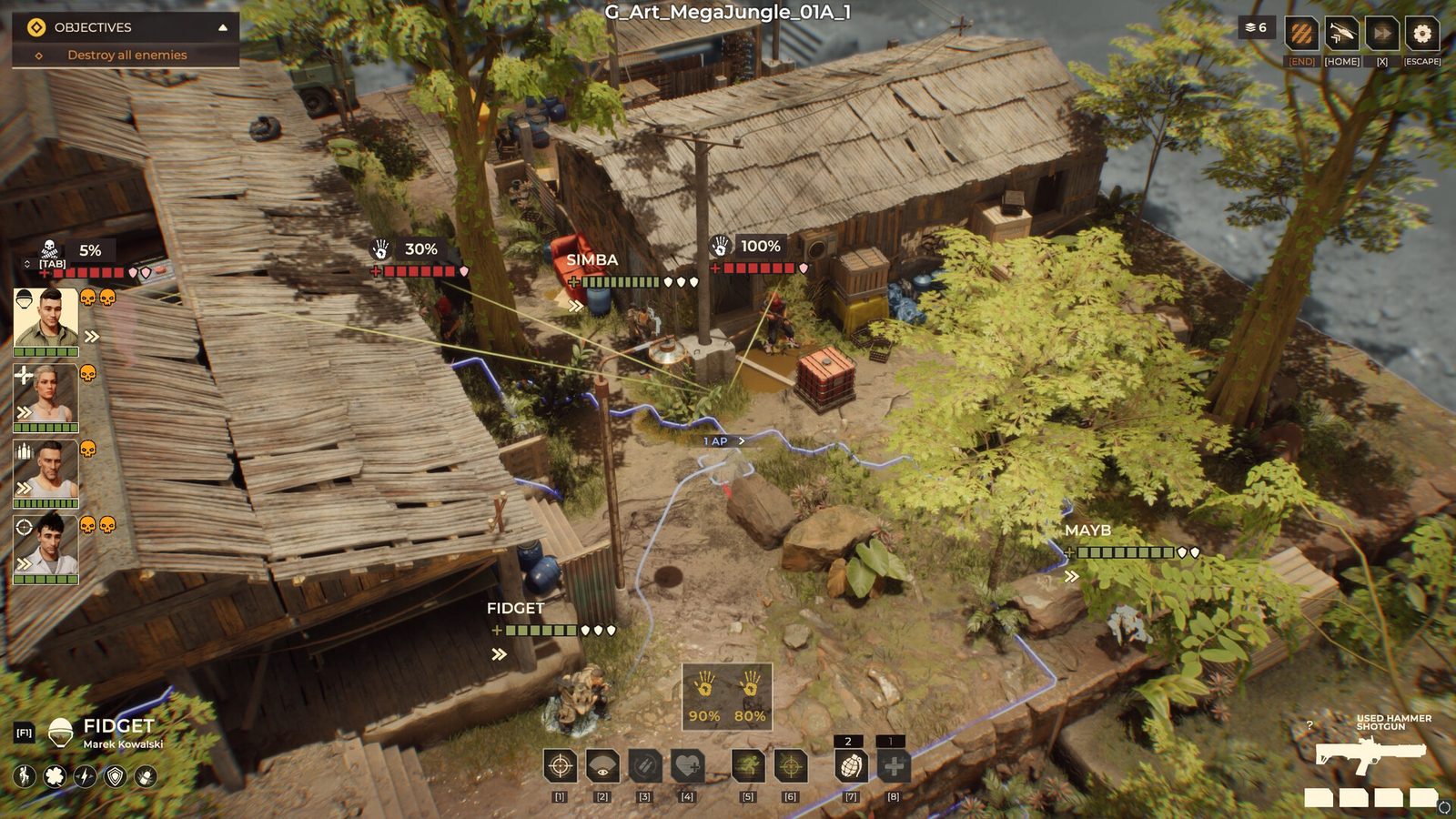
Warhounds combines a mercenary campaign with turn-based squad combat. The base handles recruitment, equipment and resources; missions ask you to read objectives, position soldiers and choose attacks. The screenshot above shows the tactical layer, not the whole campaign.
Recruit fighters, buy equipment and manage medical supplies and downtime. The five listed classes are Assault, Specialist, Sniper, Machine Gunner and Grenadier. This site does not rank a universal best squad.
Combat includes destructible cover, elevation and cone overwatch. Start with the objective and movement example, then check bursts, cover and friendly-fire risks before treating a high percentage as a safe outcome.
Faction relationships and campaign decisions affect access to missions, equipment and allies. For the documented Workshop change, see how the Recon Drone unlock changed.
Gameplay features: official Steam description, checked September 17, 2026. The developer’s 25–40 minute mission estimate is not a full-campaign completion time.
START HERE
Use the hub for orientation, then choose the page that matches the decision in front of you: first-session basics, hardware eligibility, current issues, or update history.
Read two mission examples, identify the movement-cost label, and check how the Recon Drone unlock changed.
Warhounds beginner guide → 02Locate the objective panel, selected soldier and 1 AP movement preview in an explained official screenshot.
Read the battlefield → 03See why the illustrated shot shows 45%: accuracy +80, distance −20 and cover −15.
Check the modifiers → 04Compare the current minimum and recommended hardware, VRAM, memory, and storage requirements.
Check your hardware → 05Check current official problems, recent hotfix status, and the details needed for a useful bug report.
Open issue tracker → 06Read dated official updates in release order, with player-impact notes kept separate from the source record.
Track the updates →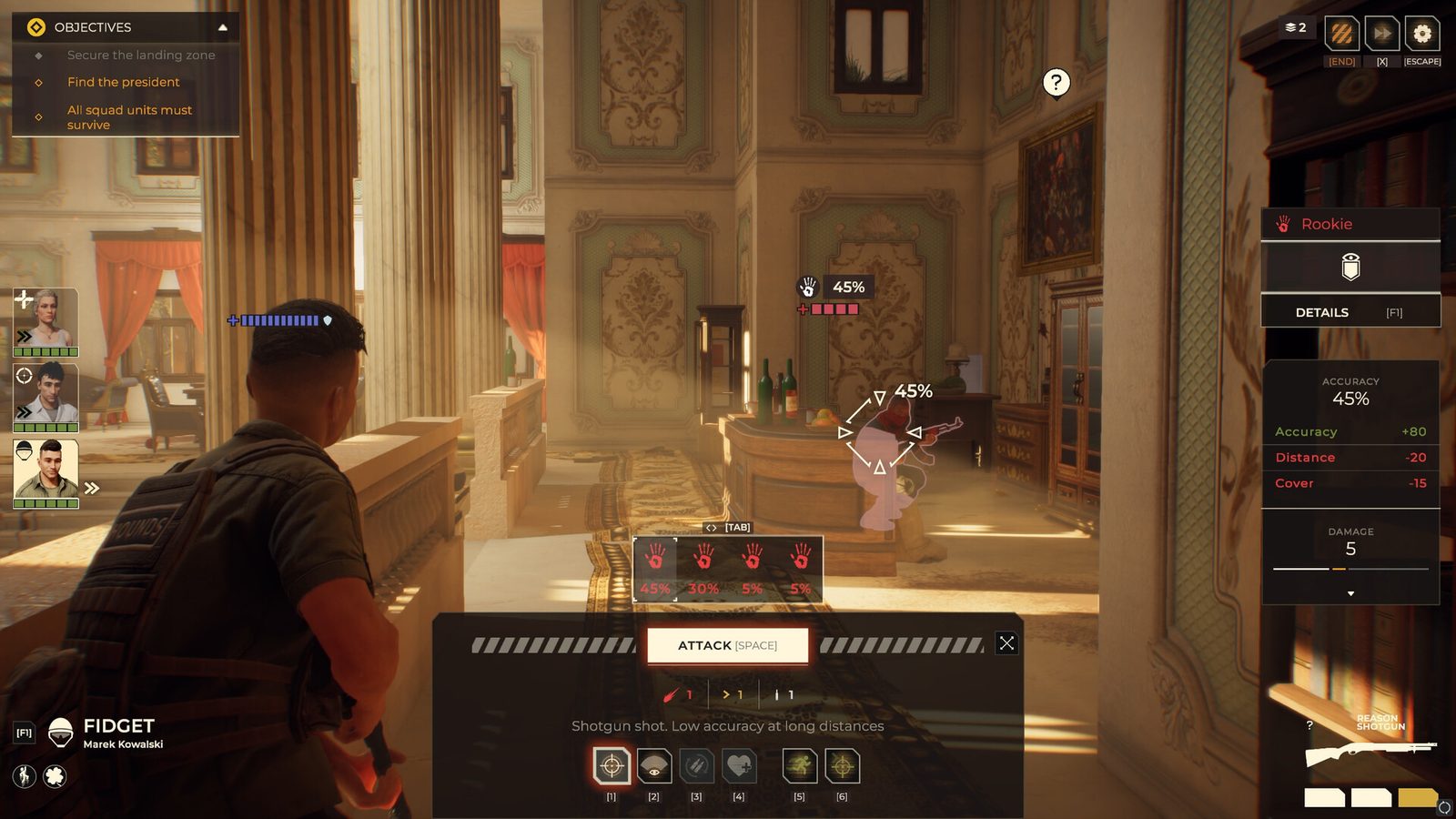
READ THE SCREEN
The official screenshot lists accuracy +80, distance −20 and cover −15: 80 − 20 − 15 = 45. The adjacent damage value is a separate readout. This explains the pictured shot, not a universal formula or a current-build test.
The preview names distance and cover separately, so a low percentage has visible context.
A changed position or target needs its own readout; do not carry this 45% over to another shot.
INDEPENDENT PLAYER GUIDE
Checking hardware? Start with the minimum and recommended table. Tracking a bug? Match its symptom to the published fix and reporting checklist. Learning combat? Use the screenshot examples. Sources and limits sit beside the relevant answers; our editorial method explains the evidence labels.